

A business owner still has to decide how the site should look, how the pages should be organized, what visitors should see first, how the mobile layout should work, how forms should be configured, how the domain should be connected, what SEO settings should be used, and how the website should be maintained after launch.
That creates a simple choice.
You can use tools such as Wix or Squarespace to build the website yourself, or you can hire someone to deliver the finished website for you.
Neither choice is automatically right for everyone.
The better option depends on what you want to spend: money, time, or a combination of both.
What Wix and Squarespace do well
Website builders exist for a good reason.
They make it possible for people who are not developers to create websites without writing the entire site themselves.
For a personal portfolio, small event page, simple landing page, early-stage business, or someone who enjoys managing their own website, a website builder can be a practical choice.
Some of their biggest advantages include:
- relatively quick setup;
- visual editing tools;
- prebuilt templates;
- hosting integrated into the platform;
- no need to configure a development environment;
- straightforward publishing;
- a large ecosystem of built-in features and third-party extensions.
If your goal is:
I want tools that allow me to build my own website.
A website builder may be exactly what you are looking for.
But that is different from saying:
I need someone to build my company's website.
No-code does not mean no work
A common assumption is that using a website builder removes most of the effort involved in creating a website.
It removes much of the coding.
It does not necessarily remove the work.
Before a business website goes live, someone still has to make decisions about:
- page structure;
- navigation;
- visual hierarchy;
- typography;
- colors;
- images;
- calls to action;
- mobile layouts;
- contact forms;
- domain configuration;
- analytics;
- basic SEO settings;
- image optimization;
- integrations;
- launch configuration.
And after launch, someone still needs to handle changes, troubleshooting and maintenance.
For technically comfortable users, this may not be a problem.
For a business owner who simply needs a professional website, it can become another project competing for attention.
The real difference: tools versus a finished product
The simplest way to understand the difference is this:
With a DIY website builder, your role may look something like this:
Choose a platform → choose a template → structure the pages → customize the design → configure mobile layouts → connect the domain → configure forms → review SEO settings → troubleshoot → launch → maintain.
With Proton Technologies, the process is closer to:
Tell us about the business → agree on what the website needs → review the design → receive the completed site → launch → request ongoing support when needed.
Neither model is inherently wrong.
They simply put the work in different places.
Design: starting from a template versus starting from the business
Templates can be extremely useful.
They solve many common layout problems quickly and give someone a starting point without requiring a designer.
The tradeoff is that the website begins with the structure of the template.
The business then adapts its content to that structure.
Professional development can approach the problem from the opposite direction:
What does this business need the website to communicate?
Then the structure, layout and design can be created around that answer.
At Proton Technologies, we prefer to begin with the business, its customers and the purpose of the site.
That does not mean every business needs an unusual or highly experimental website.
Sometimes the best website is simple.
But simple and generic are not the same thing.
A straightforward business website can still be designed specifically around the company's brand, content and customers.

A business owner should not have to become a web developer
One of the biggest differences between DIY website builders and professional development has nothing to do with coding.
It is responsibility.
When you build the website yourself, you become the person responsible for figuring out the platform.
That may include questions such as:
- Why does this section look different on mobile?
- How do I connect the domain correctly?
- Why is the contact form not sending?
- Which SEO fields matter?
- Why is the page loading slowly?
- Which plugin or app should I install?
- How do I change the header without breaking another page?
- How should the website be deployed?
- How do I make this layout look professional?
Website builders make these problems easier than building everything manually.
But they do not necessarily make them disappear.
A professional service changes who is responsible for solving them.
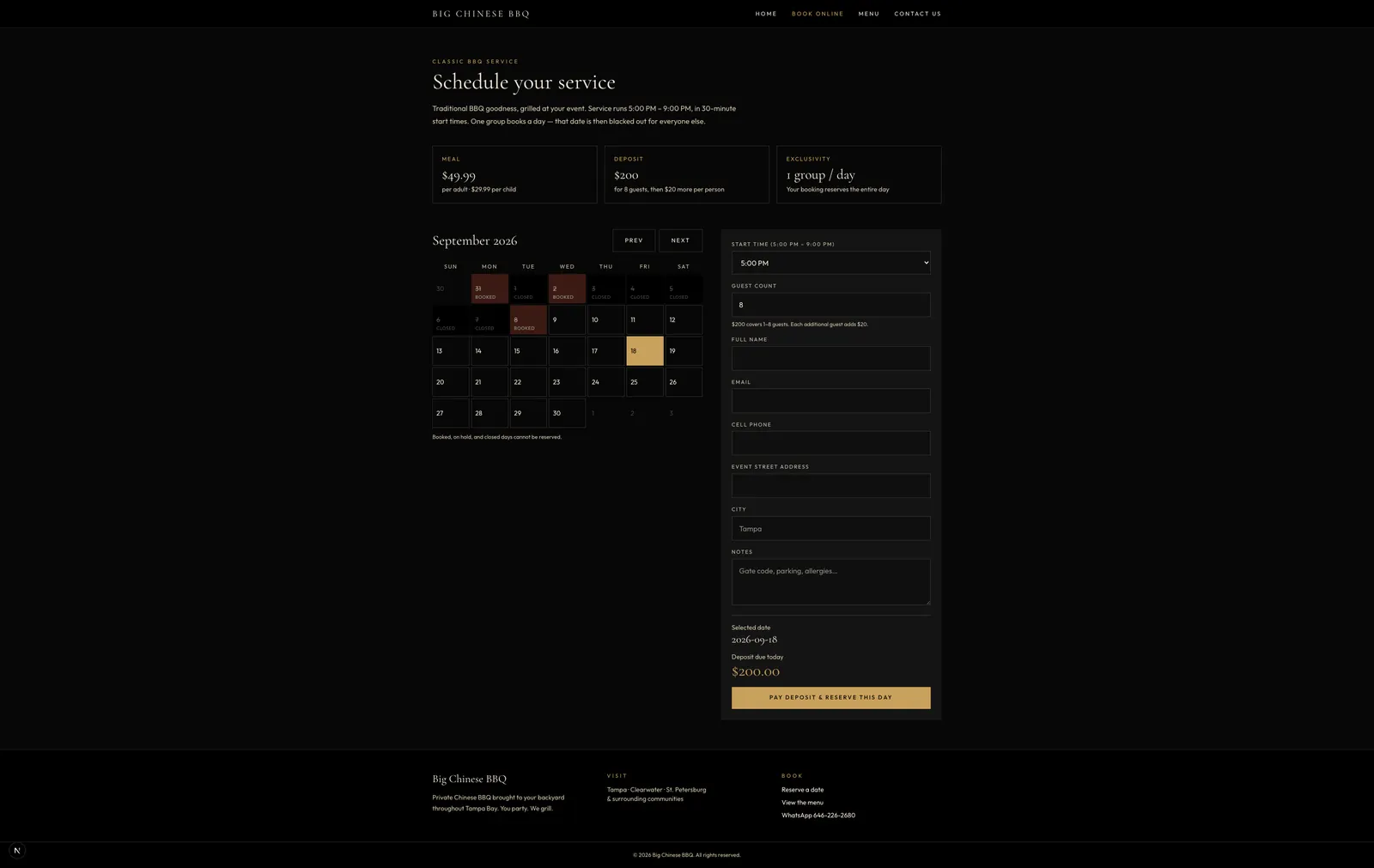
That was the turning point for Big Chinese BBQ. The business had been using Wix, but needed clearer navigation, an intuitive booking form, and online deposit payment when customers reserved a date. Those requirements were far easier to deliver in a purpose-built website than inside the builder.
Mobile design requires more than shrinking the desktop page
Modern websites have to work across a wide range of screen sizes.
A desktop layout that looks good on a large monitor may need substantial adjustments before it works properly on a phone.
That may involve changing:
- spacing;
- navigation;
- text size;
- image proportions;
- column layouts;
- buttons;
- interactive elements;
- content order.
Website builders provide responsive tools, but someone still has to review and configure the result.
When Proton Technologies develops a website, responsive behavior is part of the implementation rather than something the client is expected to troubleshoot afterward.
Performance is influenced by how the website is built
There is no honest rule that says:
Every custom website is faster than every Wix or Squarespace website.
A badly built custom site can perform poorly.
A carefully configured website-builder site can perform well.
The important difference is control.
When Proton Technologies builds a website, performance can be considered deliberately during development.
That can include:
- optimizing images and other assets;
- controlling what code is loaded;
- reducing unnecessary dependencies;
- considering loading behavior;
- selecting appropriate infrastructure;
- reviewing responsive delivery;
- keeping the implementation appropriate for what the site actually needs.
Instead of claiming that a particular platform is universally slow, we think the better question is:
Was performance actually considered while the website was being built?
For Proton Technologies projects, the answer should be yes.
SEO tools versus SEO setup
Wix and Squarespace both provide tools that allow users to configure important website information.
But providing an SEO setting and configuring it correctly are not the same thing.
A business owner still has to understand what should go into those fields and how the site should be structured.
Proton Technologies website projects include technical SEO foundations as part of development.
Depending on the project, this can include areas such as:
- page titles;
- metadata;
- crawlable page structure;
- semantic HTML;
- sitemap configuration;
- responsive implementation;
- technical page structure.
This does not mean a professionally built website is automatically guaranteed to rank higher.
Search performance depends on many factors beyond the website itself.
The advantage is simply that the technical foundation is considered during the build rather than left entirely to the client to configure.
What about updates after launch?
A DIY website builder can be attractive if you want to make frequent changes yourself.
You can log in, open the visual editor and modify the website directly.
For some businesses, that level of control is valuable.
Other businesses would rather send a request to someone else.
Proton Technologies offers optional ongoing website support after launch.
Current support options include plans starting from $15 per month or $150 per year, with higher levels available for businesses that need more frequent changes or support.
Clients who prefer handling everything independently do not have to purchase ongoing support.
The cost of a website is not only the subscription
When comparing a DIY website builder with professional development, it is easy to compare only the monetary prices.
But there is another cost:
Time.
A business owner may spend hours:
- comparing templates;
- learning the editor;
- adjusting layouts;
- finding images;
- configuring mobile pages;
- troubleshooting forms;
- working with DNS records;
- reading documentation;
- fixing unexpected issues.
For someone who enjoys doing this, that time may be worthwhile.
For someone running a business, it may be more valuable to spend that time on customers, sales, operations or other work.
That is why the cheapest software subscription is not necessarily the least expensive solution for every business.
When Wix or Squarespace may be the right choice
We do not think every business needs professional web development.
A DIY website builder may be a good choice when:
- your budget is extremely limited;
- you have plenty of time to build the website yourself;
- the site is very simple;
- you enjoy managing websites;
- you want direct control over every content change;
- the available templates already closely match what you want.
In those situations, paying a developer may not provide enough additional value.
When professional development may make more sense
Hiring someone to build the site may be a better choice when:
- you want the website finished rather than another project to manage;
- your business needs a more intentional design;
- you do not want to learn a website platform;
- responsive implementation matters;
- you want someone else handling technical setup;
- you want performance considered during development;
- you want technical SEO foundations configured;
- you expect the website to evolve;
- you want someone available when changes are needed.
The biggest difference is not simply technology.
It is who is responsible for making everything work.
Wix vs Squarespace vs Proton Technologies
A simplified comparison looks like this:
| Wix / Squarespace | Proton Technologies | |
|---|---|---|
| Initial approach | Start with a builder/template | Start with the business requirements |
| Design | You customize it | We design it |
| Page structure | You plan it | We help structure it |
| Mobile | You review/configure it | We implement it |
| Domain/setup | You configure it | We handle it |
| Forms | You configure them | We set them up |
| Technical SEO | Tools are provided | Foundations are configured |
| Performance | Depends on configuration | Considered during development |
| Troubleshooting | You handle it | Support is available |
| Ongoing changes | DIY | DIY or Proton Technologies support |
| Your time commitment | Higher | Lower |
A fair comparison of responsibility—not a scored rating of either platform.
The fundamental difference remains:
How much does professional website development cost?
Professional development does not necessarily need to begin with a large agency budget.
At Proton Technologies, simple business website development currently starts at $200.
That starting scope is intended for a relatively straightforward professional website and currently includes up to five standard pages, responsive design, basic contact functionality, technical SEO foundations, launch setup and revision rounds within the agreed scope.
Additional standard pages currently begin at:
+$40 per page
Projects requiring additional functionality—such as advanced integrations, ecommerce, portals, unusual layouts or substantial custom development—are quoted separately.
The important phrase is starts at $200.
A $200 starting point is not intended to mean that every possible website costs $200.
The final scope depends on what the business actually needs. See current details on the Website Design & Development page and pricing.
So which should you choose?
If you want to build and manage the website yourself, Wix or Squarespace may be perfectly reasonable choices.
They provide accessible tools and remove much of the technical barrier that once made building a website difficult.
If your goal is different—
I just want my business to have a professional website, and I want someone else to handle it properly.
then hiring a professional may be the more practical choice.
The value is not only the code.
It is having someone take responsibility for turning your business requirements into the finished result.
Your business needs a website. You do not necessarily need another DIY project.
For a related decision about templates versus custom design more broadly, see Custom Website vs. Website Template.
Wix and Squarespace are trademarks of their respective owners. Proton Technologies Limited is not affiliated with, endorsed by, or sponsored by Wix or Squarespace.